Wednesday, 14 June 2017

Nokia 6 - Specs

Nokia 6

United we have more fun

An outstanding phone with latest Android™ and immersive entertainment

  • 5.5” bright full-HD display
  • Immersive sound with Dolby Atmos®
  • 16 MP camera

The design

Designed for perfection, built to last

Nokia 6 continues in the footsteps of our design heritage: it has a striking clean look, a smooth metal exterior and precise details – and five colors to choose from, including a limited edition glossy Arte Black.

Made to be life-proof

The body of Nokia 6 is crafted with integrity from seamless precision-milled aluminium, taking 55 minutes to machine from a solid block of metal. Together with the sculpted Corning® Gorilla® Glass, it’s made with materials that can take on life as you know it.

Smartphones for life

For decades, Nokia phones have stood for beautiful, crafted design and excellent quality. This phone is no different: it’s built to take on life as you know it – with durable and beautiful materials, great feel, and an ideal balance of performance and battery life. What’s best, your Nokia phone will stay secure and up to date with regular software updates.

Screen and sound

Watch and read on the big, bright display

The 5.5” full-HD display and wide color reproduction make it easy to enjoy your entertainment, even while out and about in bright daylight. And the wide viewing angle makes it easy to watch videos with friends.

Immersive entertainment

With Nokia 6’s dual speakers and dedicated amplifier, you get loud sound, deep bass and great clarity. Comes with certified Dolby Atmos® sound.
Camera

Document your life with the 16 MP camera

Snapping photos of your favorite moments is easy with the camera app on Nokia 6. There’s a 16 MP phase detection autofocus camera on the back, and an 8 MP camera on the front. Plus the dual-tone flash on the main camera helps you take natural-looking photos, even in low light.

Latest Android

Pure, secure and up to date

Nokia 6 comes with Android Nougat, the full spread of Google Services and no unnecessary extras. You get an experience that’s focused and clutter-free, and we’ll make sure you keep getting regular updates, so you’ll always stay on top of features and security.

The details

Nokia 6


Outside
  • Convenient fingerprint sensor
  • Bright full-HD display with sculpted Corning® Gorilla® Glass with wide color reproduction
  • 16 MP camera on the back, 8 MP on the front
  • Immersive sound with Dolby Atmos® and dual speakers
  • Available as both single SIM and dual SIM variants
Inside
  • Clean and clutter-free Android Nougat with regular updates
  • The latest generation Qualcomm® Snapdragon™ 430 processor designed for excellent battery life and improved graphics performance
  • 3 GB of RAM
  • The full set of Google services, including Google Photos and Google Play
  • Loads of space with 32 GB mass storage2 and MicroSD card support up to 128 GB3

Full specifications

In the box
Your Nokia 6
Charger
Charging/data cable
Headset
Quick guide
SIM door key
Design
Colors Arte Black (limited edition), Matte Black, Tempered Blue, Silver, Copper
Size 154 x 75.8 x 7.85 mm (8.4 with camera bump)
Network and connectivity
Network speed LTE Cat. 4, 150Mbps DL/50Mbps UL
Networks GSM: 850/900/1800/1900; WCDMA: Band 1, 2, 5, 8; LTE: Band 1, 3, 5, 7, 8, 20, 28, 38, 40
Performance
Operating system Android™ 7.1.1 Nougat
RAM Arte Black, 4 GB; all other colors, 3 GB
CPU Qualcomm® Snapdragon™ 430 mobile platform

Storage
Internal memory Arte Black, 64 GB2; all other colors, 32 GB2
MicroSD card slot Support for up to 128 GB
Services Google Drive
Audio
Connector 3.5 mm headphone jack
Speakers Dual speakers
Amplifier Smart amplifier (TFA9891) with Dolby Atmos®
Display
Size and type 5.5” IPS LCD
Resolution Full-HD (1920 x 1080, 16:9)
Material Sculpted Corning® Gorilla® Glass
Pixel density 403 ppi
Brightness 450 nits, laminated
Features Sunlight readability
Camera
Primary camera 16MP PDAF, 1.0um, f/2, dual tone flash
Front-facing camera 8MP AF, 1.12um, f/2, FOV 84 degrees
Connectivity and sensors
Connectivity Micro USB (USB 2.0), USB OTG, Wi-Fi, Bluetooth 4.1
Sensors Accelerometer (G-sensor), ambient light sensor, e-compass, Hall sensor, fingerprint sensor, gyroscope, proximity sensor, NFC (sharing)
Battery life
Battery type Integrated 3000 mAh battery4

Tuesday, 13 June 2017

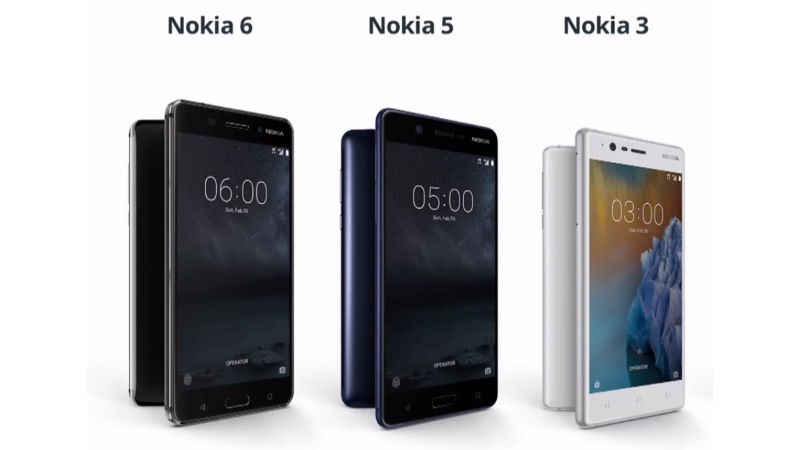
NOKIA is back with 3 BANG ON Handsets - Nokia 3, Nokia 5, Nokia 6


HMD Global, the custodian of the Nokia brand, is all set to unveil the Nokia 6, Nokia 5, and Nokia 3 Android smartphones in India today. After Nokia 3310 refresh launch in India last month, the Nokia 6, Nokia 5, and Nokia 3 budget smartphones will be unveiled at an event in New Delhi on Tuesday afternoon, where details regarding the price in India and availability date of the three Nokia Android phones will be announced. To recall, the Nokia 3, Nokia 5, and Nokia 6 Android smartphones were announced globally at MWC 2017 in Barcelona earlier this year. These are the first Nokia smartphones to hit the Indian market since the Lumia series shut down when Microsoft took over Nokia's mobile business.

Nokia 3, Nokia 5, Nokia 6 price in India
It's rumoured that the Nokia 6 price in India will be between Rs. 15,000 and Rs. 16,000 while the Nokia 5 likely to cost around Rs. 12,000. The Nokia 3, cheapest of the three, is expected to cost about Rs. 9,000 - of course all these prices are completely unofficial at this point. But with the launch just a few hours away, you won't have to wait to too long for the official prices to come out.

Nokia 6 specifications and features
Nokia 6, the best-specced of the new Nokia-branded Android phones announced so far, features a 5.5-inch full-HD 2.5D screen with Corning Gorilla Glass protection, and a fingerprint sensor below the display. The smartphone was launched at EUR 229 (approximately Rs. 16,000). The Nokia 6 runs on Android 7.0 Nougat and was powered by Snapdragon 430 processor coupled with 3GB of RAM. The handset will come with 32GB inbuilt storage, and will support microSD card support up to 128GB, and houses a 3000mAh battery. The Nokia 6 sports a 16-megapixel rear sensor, while the front camera's resolution is 8-megapixel. The company had also announced the Nokia 6 Arte Black special edition model with glossy black body with 64GB built-in storage and 4GB RAM.


Nokia 5 specifications and features
Nokia 5, launched at EUR 189 (about Rs. 13,250), has been targeted to those who want a compact smartphone, and features a fingerprint sensor. For specifications, it comes with a 5.2-inch HD display, and Android 7.1.1 Nougat. The Nokia 5 is powered by the Snapdragon 430 processor coupled with 2GB of RAM, and comes with 16GB inbuilt storage. It also supports expandable storage via microSD card (up to 128GB). Nokia 5 packs a 13-megapixel sensor on the back and an 8-megapixel sensor at the front. Other features of the smartphone include Micro-USB 2.0, NFC, 3000mAh battery, and 4G LTE support.

Nokia 3 specifications and features
Lastly, Nokia 3 was launched at EUR 139 (about Rs. 9,750), and has been targeted at those who are looking for a premium-looking handset at a budget. It comes with a polycarbonate body and metallic frame on the sides. For specifications, the Nokia 5 features a 5-inch HD display, Android 7.0 Nougat, 1.3GHz quad-core MediaTek 6737 SoC, 16GB storage, up to 128GB microSD card support, Micro-USB 2.0, NFC, 2650mAh battery, and 8-megapixel cameras on the front and back.


HIGHLIGHTS

  • Nokia 6 has been launched at Rs. 14,999
  • Nokia 5 price in India is Rs. 12,899
  • Nokia 3 Android smartphone to cost Rs. 9,499

Sunday, 11 June 2017

Apple iPhone SE Hands-on Review


What is the iPhone SE?

The iPhone SE is no longer Apple's latest phone, that honour goes to the iPhone 7 and iPhone 7 Plus. They might not be radical redesigns, but new features are plentiful. Both are water-resistant, have stereo speakers and a wider colour gamut screen. You'll have to say bye to the headphone jack though, as it's been ditched.

Phones getting bigger and bigger, but the iPhone SE totally bucks the trend. This is a phone that's easy to use with one hand. Yes the the Samsung Galaxy S7, HTC 10 and iPhone 6S Plus are great handsets, but for many of us they’re simply too large.

How can a phone with a three year old design do it? Apple has given people a choice with the iPhone SE. The compact body is rare these days, but even though it's small it packs a mighty punch. This is a very powerful and capable phone. It can boast the same top-notch internals as the iPhone 6S, a snazzy pink (sorry, Rose Gold) hue and support for Apple Pay. Normally small phones are hamstrung, the iPhone SE isn’t.

Design and display

The iPhone SE is an exact clone of the older 5S. It is difficult to spot the differences as there's hardly any. However, it is slightly slimmer and lighter. The comfort of a smaller phone is something only stubborn users of iPhone 4, 4S, 5 and 5S users will reckon. There is still a substantial percentage of such users in the country and especially globally. Also, there are several iPhone 6 users who wants to go back to the smaller version. For them, the prowess of latest iPhone 6S in the body of 5S is indeed a special edition. However, this might put off many first time buyers, especially for the price.
On the display front, again there is no major difference. Everything looks good in the small screen with a resolution of just 1136 x 640 pixels. 3D Touch is absent in the iPhone SE. Overall, the display is crisp with good contrast and viewing angles.


The new Night Shift mode makes a huge difference in darkness. It puts less strain on the eyes. Night Shift is introduced in the latest iOS 9.3 update, the feature is not supported on all older 4-inch iPhones. While 5S supports it, 5 and 5C doesn't.
The SE version has a solid build and is sturdier than the newer versions. It is compact, lightweight and is made exclusively for one-hand usage. It is also available in Rose Gold colour.

Camera and Performance

This segment is a major upgrade for older iPhone users. The iPhone SE has the camera of the 6S along with Live Photos. The 12MP rear camera is capable of shooting 4K videos along with slo-mo and time-lapse videos. There is a dual tone LED Flash at the back and on the front screen flashes to lighten selfies, like in the 6S.
Under good lighting conditions, the camera shoots good photos, but images shot under low-light without Flash will leave users desiring for more. While camera quality is good, it is not at par with the 6S or the older iPhone 6.
The iPhone SE is powered by the latest Apple A9 processor with M9 motion-tracking and PowerVR GT7600 graphics. The device is smooth and here are no glitches in performance. It might look small but it is not at all 'less powerful' than the 6S -- all iPhone users will vouch for this at least.
If you are into gaming on small screen, apps like Asphalt 8: Airborne run with ease. In short, it has the horsepower of the iPhone 6S.
The fingerprint scanner or Touch ID is included in the SE and it is fast. The phone is backed by a 1,624mAh battery. The battery life is slightly better due to a smaller low-resolution screen of the SE. Users can squeeze in one day in a full charge easily.

Verdict
The iPhone SE is the cheapest phone Apple has launched in recent years globally. However, Rs 20,200 for 16GB version and Rs 21,999 for 64GB variant are obviously over-priced. While the smaller iPhone makes perfect sense, the current pricing is a deterrent. Once, the re-imported iPhone 5S goes out of stock in India and also with the iPhone 7 launch, the prices of SE is bound to drop. The iPhone SE prices in India will simply help Apple to boost sales of the other existing iPhones for now.
The SE is just a matter of choice for people who prefer to use small screen and Apple doesn't want them to use old hardware to run new apps.

Few Unboxing Images for Golden Color 32GB version of iPhone SE which I've purchased 2 weeks ago from Flipkart for 21,999  are as below:


Wednesday, 10 September 2014

BIGGEST DISCOUNT EVER

BIGGEST DISCOUNT EVER: SELECT ANY 4 COURSES AND GET 50% DISCOUNT


Friends if you are looking for Training/Technical Courses and if you think that you are too late then here's another opportunity for you all. You can still do it in a far more easy way over the Internet via TWENTY19.com
3,00,000+ students have found answers on www.twenty19.com, Every Student's guide to the real world.
I am a Student guide from Twenty19 I would like to tell about 30+ online courses provided by twenty19 across various streams. Why should you learn from twenty19?

  • Online learning is made easy through Twenty19 courses.
  • Affordable fee for every courses.
  • Get all your doubts cleared by an expert. 
  • Grab a verified certificate on completion.
Twenty19.com is a complete website for every student not only because they are offering the courses but also because they are offering the information about all the top Internships and Events.


You can also take a free trial for all the courses here: www.twenty19.com/courses
Twenty19 is providing a BIGGEST DISCOUNT EVER where you can join 4 online courses at FLAT 50% DISCOUNT. You don't want to miss it.
So I would say go for it there are various courses available for every Engineering branches like CSE, IT, ECE, EEE and also for every other fields like Banking, Finance, Marketing etc.
ENHANCE YOU SKILLS ANYTIME ANYWHERE.........!!!!!!!!!!! :)

Wednesday, 3 September 2014

7 Mysterious Treasures the World Is Still Looking For

7 Mysterious Treasures the World Is Still Looking For

Time to channel your inner Jack Sparrow. Buried treasures aren't just pirate myths. While there are a few legendary pirate booties still allegedly floating around, troves of valuable items still await claim.From stolen Aztec gold to missing European art work, here are seven antiquated treasures at large around the world.


1. The Treasure of La Noche Triste
Location: Beneath Mexico City
In late June 1520, the Aztecs finally had enough of Hernan Cortes and the Spanish conquistadores. As the indigenous army drove their Spanish conquerers out of the capital city of Tenochitlan, Cortes commanded his men to gather as much gold and treasure as they could, stuff it in their armor and bolt for their ships.
There were two big problems though: Tenochitlan was in the middle of a lake, and gold is really heavy. This made it easier for the Aztecs to throw the Spanish over causeways and bridges, then drown beneath the weight of armor and gold.
The events of "La Noche Triste" (The Sad Night) submerged a massive amount of Aztec treasure in the waters around Tenochitlan, but Mexico City now sits on top of the dried basin.
2. The Treasure of Lima
Location: The Coco Islands
In 1820, English Captain William Thompson had a basic task: Take a treasure trove from Lima, Peru and bring it to Mexico intact. The haul never got there, though; Thompson is believed to have stashed it somewhere in the Coco Islands, 350 miles off the coast of Costa Rica.
Treasure seekers have been hunting it down for ages — even former U.S. President Franklin D. Roosevelt took a shot with friends in 1910.
The collection of gold coins and statues, jewels and jeweled swords, crowns and bars of gold and silver is worth $269 million today.
3. Col. John Singleton Mosby's Loot
Location: Somewhere near Haymarket, Virginia
With his Partisan Rangers, Confederate Col. John Singleton Mosby pulled off a risky raid on Union forces at the Fairfax Courthouse on March 9, 1863. Not only did he and his troops capture 42 union soldiers, but Mosby also looted the quarters of Union General Edwin H. Stoughton.
There, Mosby found a slew of family heirlooms for Virgina families that Stoughton and his forces took.
But as Mosby and company bailed, they encountered a large contingent of Union troops west of Haymarket, Virginia. Mosby gave the treasure to his most trusted sergeant to bury so Union forces couldn't grab it in battle. The treasure still hasn't been found.
4. Nuestra Señora de Atocha's Lost Cargo
Location: The Florida Keys
Part of this treasure has already been found, but that doesn't mean you can't get a little piece of the action yourself.
On September 6, 1622, a Spanish treasure ship — La Nuestra Señora de Atocha, or, "Our Lady of Atocha" — got caught in a hurricane near the Flordida Keys on the way back to Spain. The ship slammed into the shallow coral reefs about 35 miles from the islands, submerging almost all the crew and the entirety of the fortune 55 feet deep.
Part of the treasure was found on July 20, 1985 by American treasure hunter Mel Fisher. He claimed $500 million of lost cargo, but 17 tons of silver bars, 128,000 coins, 27 kg of emeralds and about 35 boxes of church gold are still missing, according to the ship's manifest.
Now, Fisher runs a treasure diving company that take patrons looking for the remainder of the riches. Divers frequently find coins, but no one has found the whole hidden trove yet.
5. Treasure at the bottom of Lake Guatavita
Location: Lake Guatavita, Colombia
When gold ends up under water, it's usually an accident. But a tribe of indigenous people in modern day Colombia had their priest cover himself in gold dust and toss gold into Lake Guatavita as an offering to its water god, as the tale goes.
There have been several attempts to drain the lake and dig for the gold, but the Colombian government now prohibits anyone from trying.
6. European Treasures Stolen by the Nazis
Location: The bottom of Lake Toplitz, Austria
As Nazis terrorized parts of Europe throughout the 1930s and '40s, they often plundered the homes of the people they conquered for art and other valuable objects.
When the tide of World War II turned against them, many Nazis began destroying and hiding what they took. They eventually dumped a great deal of it into Lake Toplitz, in neighboring Austria. Austria rarely lets anyone try to find what was sunken in the lake.
7. Lost Confederate Gold
Location: Near Washington, Georgia
The Confederacy was crumbling toward the middle of 1865, and as the South prepared to surrender, the Confederate government had to figure out what to do with the remainder of its treasury. There's a long, convoluted history of how the different Confederate banks were liquidated, but there's allegedly a stash of gold buried somewhere near Washington, Georgia, then worth about $140,000.

Saturday, 16 August 2014

Google Drive vs. One Drive vs. Dropbox: Which storage app works best?

Google Drive vs. One Drive vs. Dropbox: Which storage app works best?

If smartphones had unlimited storage, we’d have all our favourite movies, music and photos saved right onto our phones, carrying them everywhere we went. Sadly, we are yet to see a smartphone with capabilities that advanced. In fact, extra storage can cost quite a premium. To put this into perspective, the 64GB iPhone 5s costs an eye-watering Rs 71,500 – Rs 18,000 more than the 16GB version.


Thank heavens for storage apps! Not only can you store a lifetime’s worth of photos, music and documents on an 8GB smartphone, but you can also access them from multiple devices and maintain backups. Move over physical storage options – cloud storage apps you can save you time, space as well as the money you’ll be spending on memory cards.


Many smartphones come pre-equipped with storage apps. Motorola provides 50GB of Google Drive storage with its Moto devices; while phones running on the Windows Phone operating system come with nearly 20GB of One Drive storage. But the perfect storage app may vary depending on how you intend to use it. Here’s a look under the hood helping you find out what each cloud service has to offer and which one will suit you best.


Automatic photo upload

Both Dropbox and One Drive have the option to automatically transfer photos from your phone to the cloud. This allows you to delete old photos and free up space on your phone. While you can upload photos to Google Drive, you’ll have to do so manually as there’s no ‘Automatic upload’ feature.


Camera backup on One Drive and Dropbox


Creating and editing documents

With Dropbox, you can open office documents such as spreadsheets and Word files. But you can’t edit them from within the app. However, are given the option to open files on any document-editing app such as Google Drive or Office Mobile.


One Drive opens documents, spreadsheets etc on Office Mobile – Microsoft’s free Office app for mobile. If you don’t have it installed, the app asks you to download the app so you can proceed. This is the default setting, but you can change this by un-checking Office Mobile in the settings.


You can’t edit documents in Google Drive either – it makes use of office apps such as Google Docs or Office Mobile for editing documents.


Privacy

If you intend to save personal files on the cloud, you can’t possibly ignore its privacy features. All the three apps – Dropbox, One drive and Google Drive ensure that files are private, unless you choose to share them with others. However, Dropbox and Google Drive also includes an option to lock the app with a passcode so that no one other than you can access the stored files.


Locking features in Dropbox and Google Drive


Sharing

Sharing is Google Drive’s strongest feature, which gives it an edge over Dropbox and One Drive. You can either choose anyone with the link to access your files, or assign specific people who can view, comment or edit photos.


Both Dropbox and One Drive let you share files only by sending the link to the files. The receiver gets a copy of the file and cannot make changes or add comments to the original file.


Features

Dropbox has some of the best features out of the the three options. It comes with a linking system, which allows you to connect your desktop to your Dropbox account. This it does by just clicking a picture of your desktop screen.


The Dropbox app lets you link to a computer in three steps


One Drive comes with 18GB of free storage space, while Google Drive comes with 15GB. Dropbox comes with 2GB of free storage when you sign up, though it increases as you use the app. For example, you get extra space every time you add a new device to Dropbox such as your smartphone or PC. Unlike One Drive and Google Drive, Dropbox does not have any file-size restrictions either.


All the three storage apps let you print, delete and move files between folders from within the app.


Verdict

While all the three cloud apps are excellent for basic use, Dropbox tops the list for its flexibility, privacy and range of features.


Dropbox: iOS|Android|Blackberry

Google Drive: iOS|Android|Windows Phone

One Drive: iOS|Android|Windows Phone|Blackberry

Sunday, 29 June 2014

ONLINE COURSES AT TWENTY19.COM

Exciting courses at twenty19.com


Friends if you are looking for Summer Training/Courses and if you think that you are too late then here's another opportunity for you all. You can still do it in a far more easy way over the Internet via TWENTY19.com

Here is a PROMOTIONAL CODE:  "friendlearn44" by which you can get 15% DISCOUNT on every courses limited period OFFER .

So I would say go for it there are various courses available for each the branches CSE, IT, ECE, EEE. ENHANCE YOU SKILLS ANYTIME ANYWHERE.........!!!!!!!!!!! :)

For more info please visit: www.twenty19.com/courses
or Email: akshayn73@gmail.com

Friday, 13 June 2014

MY STORY WITH MICROSOFT


My Story: "How Microsoft has impacted your life and how you plan to bring a change to the society being a Microsoft Student Associate?"


First of all I want to start with my one line vision for MSA which is: 
Let’s SHARE, CARE and GROW together!

Microsoft, a Big Name and I think today no one would say that he/she didn't heard about this company. Well talking about Microsoft in my life then I simply say the Knowledge, the Skill which I've gained today is all because of Microsoft. It seems to be awkward but 12 year ago I was dumb in Computer, the thing which I know is that how to Turn On a Computer and start a Game. But When I heard My Dad talking about Microsoft and then I also got interest in Computer Field. Now in free time also, I usually read about Microsoft Company Profile, how it is organized by Bill gates after this I search about various Products of Microsoft i.e. Windows, Office, Windows Phone, Bing, Xbox, Skype and last but the latest about which I am very interested is NOKIA DEVICES.

Microsoft also launched many Program which help me out for getting a Professional Assistance and the example of this supports are Microsoft Virtual Academy.

Because of Microsoft and few other tech companies only I’m the owner of this Blog. The impact of Microsoft in my life is like the HEART AND SOUL of each and every electronic devices like PC's, Tablets, Smartphones etc. Well I think Microsoft also plays an important role in other Student's Life. The Main Motive of My Blog is to Spread Technical Updates and support to Engineering Student.

Well now I want to talk about my future plan which will be Executed as a MSA. Microsoft is one of the best and most popular organisation among every other every student is also attached with Microsoft directly or indirectly. In most of the college campuses like mine there is still a huge gap between students and Microsoft like many of students doesn't know all the services and software provided by Microsoft. And I want to minimize this gap so that there must be proper awareness among all the students and they could know better what Microsoft is really capable of.

So, as I’m applying from Greater Noida, Uttar Pradesh situated Institute i.e. DIT School of Engineering(DITSE) my first target is to spread update and enhance skills of student of My Institute and my neighbor Institutes i.e. Institutes situated nearby my college campus. Since my college is situated in an area where there are more than 25+ other engineering college so I believe that my Vision will definitely bring a huge and sudden change among all the students of Knowledge Park area Greater Noida.

My first step towards this target is a combine seminar on some technology updates like Cyber Security, Programming Languages Workshop and other technical activities like coding challenges etc. Workshop and Seminar will not only make them updated but also they’ll get extra knowledge about Microsoft and about the technologies like HeartBleed Vulnerability, Web Designing Advancement ( Bootstrap ) etc.


If budget comes in my way then apart from workshops I would be arranging some introductory classes for students like ASP.NET with C# which would be very helpful for the students for their Mini-Projects and Final-Projects. And during these courses we can provide students some introduction of MSSQL Server which will help in Database Connectivity. And the interest of the students will automatically do the rest of my work.

Having knowledge about technology is not a single step of my Plan. The second and the simple step towards this target is by making them to implement this knowledge because any Technical Knowledge is useless if you can’t even implement It. I’ll Introduce Some Technical Event in which the candidates will be assigned with a Project and after which they’ll get support from us.

Now you all are surprised that how can I implement this Plan without any Financial Aid. Well I want to tell you that spreading knowledge is my main aim and for financial aid I’ll use my monetized money of this Blog .

My third and the last Step for my target is to make a blog where all Microsoft product are described and also the Tutorial to use them Azure, Windows App Development and Cloud Computing is one of them.

It will be a pleasure for me to be selected as MSA for the Year 2014. Because being a Microsoft Member is one of the Greatest Achievement for me. But my primary aim is to help the society and make them updated with these Microsoft Technologies.

We at DITSE have capacities to come up with such out of the box ideas and being a MSA, I am positive that I can take these messages to every student so that everyone at least gets to try and make a difference.
Thank you for taking your time and hearing me out.


Friday, 6 June 2014

Everything You Need To Know About the New OS X 10.10 Yosemite

Everything You Need To Know About the New OS X 10.10 Yosemite

At the annual Worldwide Developers Conference 2014, Apple didn’t only announce the upcoming iOS 8 mobile operating system, they also unveiled their next-generation OS X 10.10 Yosemite. The new OS follows the footsteps of OS X Mavericks, and comes with a handful of new features on board. The good news is: it will be available this fall as a free upgrade for people running on OS X 10.9 Maverick.

OS X 10.10 Yosemite will come with a cleaner user interface, with flatter icons and translucent bars. As we said, it has taken some of the design cues from iOS, and features improved features, icons, buttons and even a new system font for improved readability. There’s also a dark mode that dims the entire interface for improved focus while you’re working.

Apple has also improved the notification center in the new version, giving users a lot more detail. There’s a Today View in the notification center, which give users an overview of everything, such as upcoming events, reminders, stock information and more. You can even add widgets from the Mac App Store to customize the notification center, and display the things which matter to you.

There’s an improved spotlight search as well — it went through some enhancements on iOS as well. In addition, the built-in apps have received major updates as well, including Mail, Messages and Safari. Apple also introduced a new app called iCloud Drive, which is a Dropbox alternative, and give users the ability to save their files in the cloud so they are accessible on every device — Mac, iPhone, iPad and even Windows PCs. Thew new messages app gives users the ability to receive and respond to iMessages, and SMS messages on their Mac.

Another interesting feature is the ability to make and receive calls on your Mac. OS X 10.10 Yosemite and iOS 8 works in conjunction with each other, so that you can make and receive calls on your Mac, no matter where your iPhone is in your house. It’s not just the phone calls, the messages on your iPhone are also available on your Mac. Now, if you are working, you don’t have to look for your iPhone if you receive a message — iMessage or SMS — and respond it directly.

There’s a new Handoff feature as well, which was discussed in iOS 8 as well, and lets users connect all their Apple devices, and work with them. You can continue on any device you own, for example, if you started writing an email on your iPad, and decided to switch to your Mac, you can continue it from where you left off on the iPad.

The new OS X 10.10 Yosemite also features a new Instant Hotspot feature, which basically uses your iPhone as a hotspot. There’s no setup required, and it will connect to your iPhone when both devices are in range. It will be displayed in the WiFi menu on the Mac, and shows the amount of battery left as well as the signal strength. Interestingly, it will disconnect from the hotspot when it’s not in use to save the battery life on your iPhone.

The new OS X 10.10 Yosemite will be released later this fall, possibly alongside the iOS 8. However, if you’re an enrolled developer, you’ll be able to grab it from the online Apple portal. Apple also said there will be a public beta later this summer so that normal users can try the new OS and give their feedback

Thursday, 5 June 2014

Moto E, Moto G and Moto X Start Receiving Android 4.4.3 KitKat Update

Moto E, Moto G and Moto X Start Receiving Android 4.4.3 KitKat Update

Motorola, soon after Google released the Android 4.4.3 KitKat factory images for Nexus devices, on Tuesday announced the same update for its Moto E, Moto G and Moto X.
In a blog post, Steve Horowitz, SVP, Software Engineering, Motorola said, "We are excited to announce some icing on top of the, well, KitKat. Starting today [Tuesday], we are rolling out Android 4.4.3, KitKat, which was just released by Google."

The company notes that the latest Android 4.4.3 KitKat update for Motorola handsets will start rolling out this week, with the first recipients listed by Motorola. Moto X T-Mobile users will receive the update first, while Moto G users in the US, who bought the smartphone online (also includes Moto G 4G LTE), and the Moto G users in Brazil, will receive the first updates for the handset.

For the Moto E, US users who bought the handset online will receive the update first. The company also notes that the Moto E will be receiving the next major Android update (as yet unspecified) as well, and added, "Consider this the cherry on top."

The company has announced that the Android 4.4.3 KitKat update for Moto E, Moto G and Moto X can be expected to be rolled-out globally in the coming weeks.

According to Motorola, the new Android 4.4.3 KitKat update for Moto E, Moto G and Moto X brings an improved dialler with updated interface; stability, framework and security fixes, as well as enhancements to the power profile capabilities.

Motorola has also listed the changelog for the Android 4.4.3 KitKat update for all three Moto smartphones. The Moto E will be receiving an updated phone dialler with a new graphical layout and colours to get better consistency and usability.

The Moto G, on the other hand, will be receiving a new pause video recording feature on the viewfinder; an updated phone dialler, much like the Moto E, and access to Motorola Alert, which is an app that sends periodic alerts with the user's location to selected contacts.

Lastly, the Moto X receives camera enhancements such as improved image quality with consistent exposure and flash colouring, as well as better photos in low light conditions using front camera.

The update for Moto X also brings ability to pause video recording with a pause/resume button on the viewfinder, much like the Moto G update. The Moto X also receives the updated phone dialler and can now download the Motorola Alert app.

In addition, the Samsung Galaxy S4 Google Play Edition also started receiving Android 4.4.3 KitKat update. The new update for Galaxy S4 GPE brings usual fixes for bugs and improvements to security, and stability

Wednesday, 4 June 2014

10 Excellent Features Introduced in the latest iOS 8

10 Excellent Features Introduced in the latest iOS 8

Apple’s Worldwide Developer Conference (WWDC) 2014 has kicked off in style, with the Cupertino-giant unveiling it’s upcoming mobile operating system dubbed as iOS 8. While the design is almost the same as iOS 7 except a few new animations, Apple has introduced many new features and enhancements to make the OS better than its predecessor. If you missed the Apple keynote yesterday, here’s everything you need to know about the upcoming iOS 8:

1. Compatibility
Apple has a history of providing support for old devices. When iOS 7 came it out last year, it came with support for the good old iPhone 4 as well. And, this year, the latest iOS 8 will be compatible with iPhone 4S as above — sorry iPhone 4 owners, but you’ll not get iOS 8. The complete list of devices include, iPhone 4S/5/5S/5C, iPad Mini, iPad Mini with Retina, iPad Air, iPad 2, iPad with Retina and iPod 5th generation. This is a handsome list of devices, meaning that all popular iOS devices will get the update.

2. Health and Fitness Dashboard
As rumored before, the new iOS 8 comes with a Health dashboard which give users the ability to measure fitness-related metrics, such as calories burnt, heart rate, cholesterol level, sleeping patterns, and more. What’s even more interesting is the way the data is collected. Some of it comes from wearables such as Nike bands, while others come from apps and third-party sources such as Mayo Clinic. It also let users create an emergency card, which is displayed on the lockscreen for emergency purposes.

3. Improved Notification Center and Multitasking
The new iOS 8 brought some much needed improvements. One of the most notable ones is the interactive notifications, a new feature which give users the ability to respond to notifications from the Notification Center. This means you can reply to your emails, messages or texts without leaving the app you’re using. You can even comment or like Facebook posts from the notification center.

In addition, the new operating system adds more content to the multitasking screen. Along with the opened applications, the multitasking screen on the device now shows your favorite contacts so you can contact them from the multitasking window.

4. Messages
There are some new features for the messaging app as well. Now, you can send voice notes, images, and even create groups where you can multiple contacts and get in touch with them — send images, voice notes, video clips and make calls. You can even share your location with the group of friends, to let them know where you are, or if you’re waiting to meet them.

5. QuickType Keyboard
The new OS also comes with an improved version of the keyboard, which they call it QuickType. Personally, I feel like the existing iOS keyboard is already very good, but the new one makes it even better. The new keyboard suggests words periodically to complete the sentences —  the prediction capabilities demoed during WWDC keynote looked pretty good. It even recognizes whether you’re writing in the Mail or Messages app. At the moment, the predictive text is optimized for 14 countries, including US, UK, Canada,

6. Family Sharing
This is another interesting feature which give family members the ability to share their iTunes content, such as app purchases and iBooks with other members of the family. Once enabled, you can even access content from other family members. You can even set up a family photo stream where images taken by your family members on all devices. It’s not just sharing content, you can even find out where you family members are on a map, which is similar to the Find My iPhone app.

7. iCloud Drive
iCloud Drive is a cloud storage service which lets users save their files, documents and other media files online, and access them on any iOS device you own. It’s not just iOS devices, you can even view and work with the files on your Mac or PC.

8. Handoff
The new Handoff feature is another notable one introduced in the iOS 8. The new feature connects iOS devices together so you can work in conjunction. This means you can start writing an email on your iPhone, and continue where you left off on your iOS device and vice versa. It even lets you check and reply to messages from your Mac, and you can even answer calls on your Mac or iPad, provided its running the latest OS X Yosemite and iOS 8, respectively. No need to find out where your smartphone is when you are working.

9. Spotlight
Spotlight is the new iOS search feature, which let users search for anything, such as their installed apps, iTunes content, and much more. It will show you everything, even from third-party sources such as Wikipedia or any news related to the searched query.

10. Touch ID And New APIs
This is another interesting access Apple is giving to third-party developers. Previously, Touch ID was only accessible for security purposes to unlock your device or to make iTunes purchases. But, with iOS 8, developers can create apps which can make use of the sensor. It’s not just the Touch ID access, the new SDK comes with 4,000 new APIs for developers to explore the capabilities of the OS.

11. Release Date
The developer preview of iOS 8 is already available for registered developers so they can test their apps, and explore the new APIs for their apps, to make full use of the operating system. For consumers, the operating system will launch this fall, and possibly with the new iPhone. Apple is rumored to be working on two new iPhones which are expected to see the light of the day this fall, possibly with a bigger screen.

There you go folks. I think Apple has done a commendable job with the latest iOS 8 operating system, adding new features and enhancements, and much more. What do you think about iOS 8? Let us know using the comments below

Tuesday, 3 June 2014

Sony Xperia T3 super-slim Android smartphone launched

Sony Xperia T3 super-slim Android smartphone with 5.3-inch display and quad-core processor launched

Earlier today Sony put up a teaser poster of a new device claiming it’s the ‘next big thing’ and now it has announced the super-slim Xperia T3. While it may not be as thin as the Gionee Elife S5.5 (5.5mm), it still boasts a thickness of only 7mm. Sony has revealed that the device will be available ‘from the end of July’ in select markets.
As far as specifications are concerned, the Xperia T3 flaunts a 5.3-inch HD 720p display with a pixel density of 277ppi and is powered by a 1.4GHz quad-core processor paired with 1GB of RAM. Also included is, 8GB internal storage that can be expanded up to 32GB using a microSD card.

The smartphone also features an 8-megapixel rear camera, 1.1-megapixel front-facing camera, and a 2,500mAh battery that the company claims is good enough for more than 12 hours of talktime and up to 688 hours on standby mode.

Connectivity options include LTE support, Wi-Fi, Bluetooth and on the software front, it runs on Android 4.4 KitKat. Sony hasn’t mentioned if the device boasts water and dust resistant capabilities, but chances are it does. Design-wise, it follows Sony’s Omnibalance design language, but in place of the glass back the Xperia T3 might get a matte finish.

As mentioned above, there is currently no word on the pricing or when Sony plans on launching the device in India.

Another killer for MOTO E by XOLO

Budget KitKat invasion continues as XOLO Q600s arrives for Rs 8,499

We had earlier featured the Q1000 Opus, which was launched late last year now we have another addition to the Q-series by XOLO called the Q600s, which runs on the Android KitKat 4.4.
 
The device will sport a 4.5-inch qHD IPS display with a screen resolution of 960 x 540. To enhance the smartphone’s touch response experience, it comes with OGS (One Glass Solution) and full lamination. The smartphone is powered by a 1.2GHz Broadcom quad-core processor with 1GB of RAM. The phone comes with a 5MP rear camera with LED flash and a VGA one in front. It also has 4GB in-built storage which is expandable using a microSD card. The 2000mAh battery provides a standby time 400 hours and a talk time up to 11 hours.
 
The smartphone features a dual-SIM card slot and houses 3G, Bluetooth and GPS as part of the connectivity options. The smartphone is priced at Rs. 8499 and will be available in two colours, black and white. The popular e-commerce website Snapdeal has an introductory price-tag of Rs 7499, but it is likely to increase.
 
XOLO smartphones are known to be present across urban India with product being available in almost of major retail stores.